Business Central Implementation Timeline for 2026: What to Expect
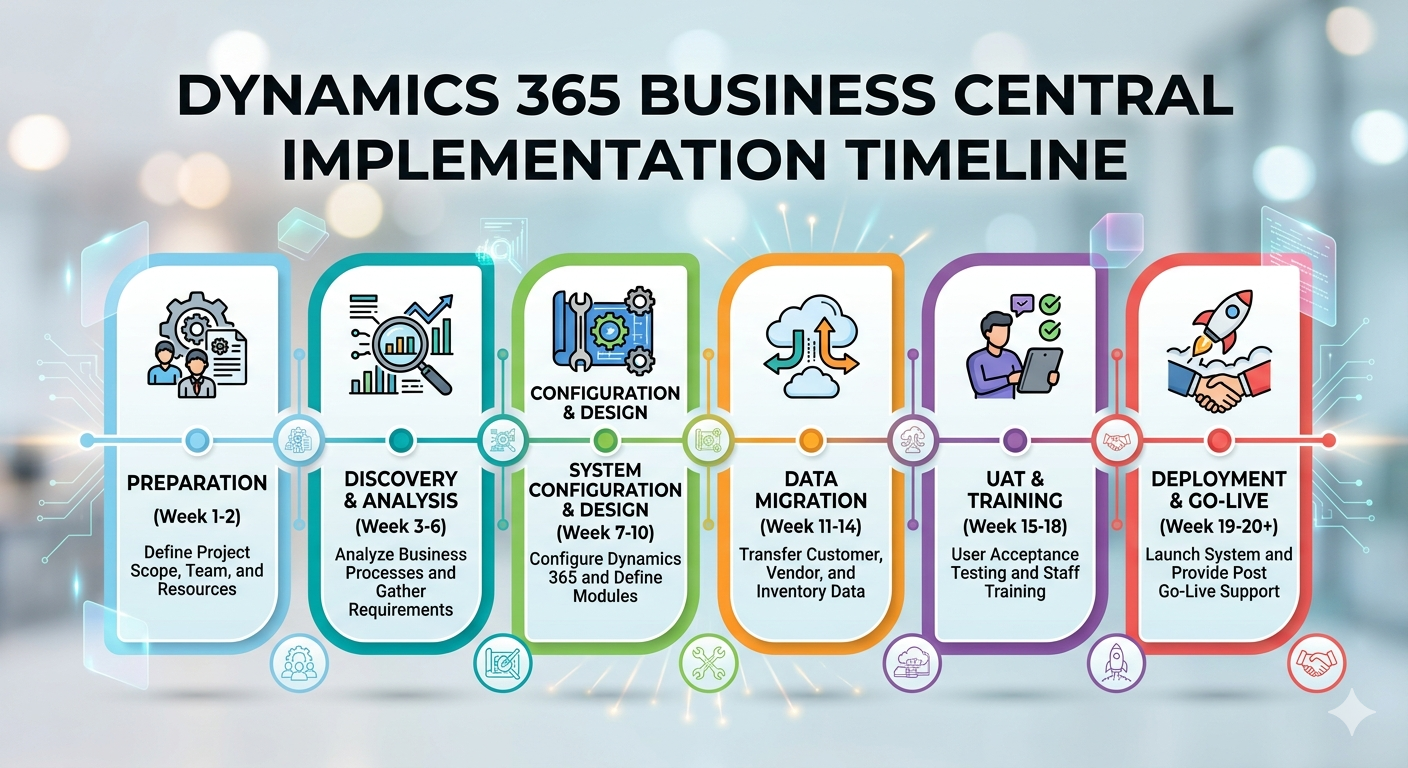
The way organizations implement Microsoft Dynamics 365 Business Central has fundamentally shifted. What was once a contained migration project with a fixed go-live date is now a strategic program one that spans discovery, piloting, staged deployment, and continuous evolution. In 2026, that shift is more pronounced than ever.
Business Central is Microsoft’s cloud ERP solution for unifying finance, operations, and analytics for small and mid-sized businesses. But the 2026 release landscape is defined by rapid AI advancement, biannual update waves, and a composable architecture model that rewards planning over speed. For IT leaders, executives, and project managers, the implication is clear: Business Central 2026 implementation demands a different mindset from the start.
What’s Driving Change in 2026
Four trends are reshaping how implementations are scoped, scheduled, and managed this year:
AI and Copilot are no longer optional add-ons. They’re embedded across modules from automated invoice processing to natural language analytics and need to be planned for, not bolted on after go-live.
Composable ERP is the new standard. Rather than building custom code for every business need, the 2026 model favors extensions, AppSource apps, and modular configurations. Composable ERP means assembling a tailored solution from pre-built, interoperable components rather than writing bespoke functionality, a shift that improves upgrade resilience but requires careful governance.
Biannual release waves require ongoing upgrade planning. Microsoft ships two major update waves per year. Organizations that don’t plan for these cycles find themselves constantly reacting rather than adopting proactively.
Cloud migration tooling has matured. Broader SQL-based system support means migrations from legacy platforms are more streamlined but only when properly scoped.
Each of these trends adds checkpoints to the implementation journey and changes where time and budget need to be allocated.
The Phased Implementation Model
Successful Dynamics 365 Business Central implementation phases follow a staged progression not a single event. Here’s the structure that minimizes risk and keeps scope under control:
| Phase | Key Activities | Exit Criteria |
| Discovery & Process Mapping | Stakeholder workshops, workflow analysis, gap assessment | Signed-off future-state process maps |
| Data Audit & Migration Design | Legacy data audit, field mapping, dimension redesign | Validated migration plan and clean dataset |
| Integration & Extension Selection | Integration architecture, AppSource evaluation, ISV governance | Approved integration and extension list |
| Pilot Migration & UAT | Test migrations, reporting validation, user acceptance testing | Stakeholder sign-off on data and reports |
| Staged Go-Live | Phased rollout by unit/location, hypercare support | Stable production environment, KPIs met |
| Stabilization & Optimization | Support monitoring, adoption tracking, feature rollout | Adoption metrics achieved, upgrade cadence documented |
The value of this model is predictability. Each phase has clear outputs and defined entry conditions for the next, which contains scope and gives leadership meaningful progress signals throughout.
Discovery and Business Process Mapping
Business process mapping is the documentation and analysis of how work flows through an organization identifying inputs, outputs, decision points, and inefficiencies to establish the baseline for system design. It is the most important phase of any implementation and the most commonly rushed.
The goal here isn’t to replicate what your legacy system did. It’s to interrogate whether those processes were ever right. Modernization workshops, not just configuration sessions should drive this phase. Ask stakeholders: Which processes are most critical to automate? Where do manual handoffs create delays? What reporting does leadership actually use for decisions?
Getting honest answers to these questions before touching a single configuration setting prevents months of rework downstream.
Data Cleansing and Migration Design
Data migration is the process of extracting, transforming, and loading data from legacy systems into Business Central with validation checks to ensure accuracy, completeness, and structural alignment.
It is also the most consistent source of project delays. The reason is straightforward: organizations rarely know how dirty their data is until they try to move it. Duplicate vendors, inconsistent GL account structures, missing dimension values, and non-standard date formats all surface during migration and create far more work than initial estimates account for.
Data audit checklist:
- Inventory all legacy data sources and owners
- Identify and resolve duplicate records
- Map legacy fields to Business Central equivalents
- Redesign reporting dimensions to match BC’s structure
- Run test migration cycles with representative data samples
- Validate outputs against source records before go-live sign-off
Multi-entity organizations and businesses with non-standard GL accounts should budget significantly more time here than single-entity SMBs.
Integration Architecture and AppSource Extension Selection
An AppSource extension is a pre-built, Microsoft-validated application available through the Business Central marketplace that adds specific functionality such as advanced warehousing, EDI, or payroll without requiring custom development.
Integration work is where timelines most frequently slip. The assumption that connecting Business Central to an existing CRM, e-commerce platform, or third-party logistics system will be straightforward is almost always wrong. Each integration point requires architecture decisions, testing, and governance particularly for per-tenant extensions and ISV applications.
The practical guidance: evaluate every integration against available AppSource solutions before scoping custom development. Proven connectors reduce build time and upgrade complexity. Where custom code is genuinely needed, track it in a central change log and subject it to formal approval before development begins.
Pilot Migration, UAT, and Reporting Validation
Pilot migration validates that your data transformation logic, dimension mapping, and reporting structures work correctly before committing to full production load. Business Central’s reporting model is dimension-driven and rarely aligns one-to-one with legacy formats; this phase is where that misalignment gets resolved, not discovered post-launch.
User acceptance testing should run in parallel, with real end-users testing actual daily workflows. Reporting validation best practices include reconciliation tests against source data, accuracy checks at the transaction level, and formal stakeholder sign-offs on financial outputs. No phase exit without documented approval.
Staged Go-Live and Stabilization
Go-live is the point at which Business Central becomes the system of record for production operations. Stabilization is the structured period immediately following, dedicated to resolving issues, reinforcing user adoption, and confirming the system is performing as designed.
A staged go-live rolling out by business unit, location, or function rather than all at once significantly reduces risk. It limits the blast radius of any issues and allows the implementation team to apply lessons from early phases before broader deployment.
Stabilization is not optional. Dedicated support staff, pre-defined escalation paths, and measurable adoption metrics need to be in place from day one post-launch. Organizations that invest in formal stabilization report measurably higher user confidence and fewer support tickets within six months.
What Drives Implementation Duration
| Factor | Typical Timeline Impact |
| Data complexity (multi-entity, legacy GL) | 4–8 weeks |
| Number of integrations | 2–4 weeks per major integration |
| Custom development scope | 3–6 weeks per significant customization |
| Security and role mapping complexity | 2–3 weeks |
| User count and training requirements | 1–3 weeks |
| AppSource extension governance | 1–2 weeks |
Business Central implementation duration ranges from 3 months for lean, well-prepared SMBs to 9–12 months for multi-entity or highly integrated environments. The single most reliable predictor of timeline is data readiness at project start.
Budgeting Realistically for 2026
Total first-year costs typically run three to five times annual licensing fees once migration, customization, training, and stabilization are included. Many organizations budget for the license and are surprised by everything else.
| Cost Component | Notes |
| Licenses | Essentials $80/user/month, Premium $110/user/month |
| Implementation services | Largest variable; scales with complexity |
| Data migration | Often underestimated by 30–50% |
| Customizations / extensions | Minimize custom code where possible |
| Training | Role-based; budget per department |
| Ongoing support | 15–20% of implementation cost annually |
Business Central implementation cost planning should include a contingency buffer of at least 15% for scope changes and data surprises not as a pessimistic assumption, but as a standard project management practice.
Partner Selection: What to Look For
The right implementation partner is the single most controllable variable in your project timeline. Look for:
- Proven methodology covering process redesign, configuration, training, and post-go-live support
- Microsoft certifications and Solutions Partner status
- Industry-specific experience in your sector
- Transparent fixed-price or milestone-based pricing
- Verifiable client references with similar project scope
Red flags: suspiciously low quotes, over-reliance on custom development, vague methodology, and reluctance to provide references. These patterns reliably precede budget overruns and failed go-lives.
The 2026 Outlook: ERP as a Rolling Transformation
The organizations getting the most from Business Central in 2026 are not treating it as a finished implementation. They’re treating it as a platform that evolves with biannual release reviews built into their operational calendar, dedicated resources for feature adoption, and a roadmap that anticipates regulatory and AI-driven changes rather than reacting to them.
AI and Copilot capabilities will continue expanding with every release wave. Businesses that embed upgrade planning into their governance model from day one will adopt these capabilities faster and with less disruption than those who treat each wave as a surprise.
Conclusion
A successful Business Central implementation in 2026 is not a sprint to go-live. It’s a structured program built on clean data, well-mapped processes, disciplined integration governance, and a long-term commitment to continuous improvement. Organizations that approach it that way with the right partner, realistic timelines, and a phased model consistently deliver better outcomes than those chasing a fast launch.
If you’re planning a business central implementation this year and want a partner with the methodology and industry depth to get it right, Folio3 Dynamics is ready to help you build a roadmap that works.