Common Mistakes When Buying KVM Switches
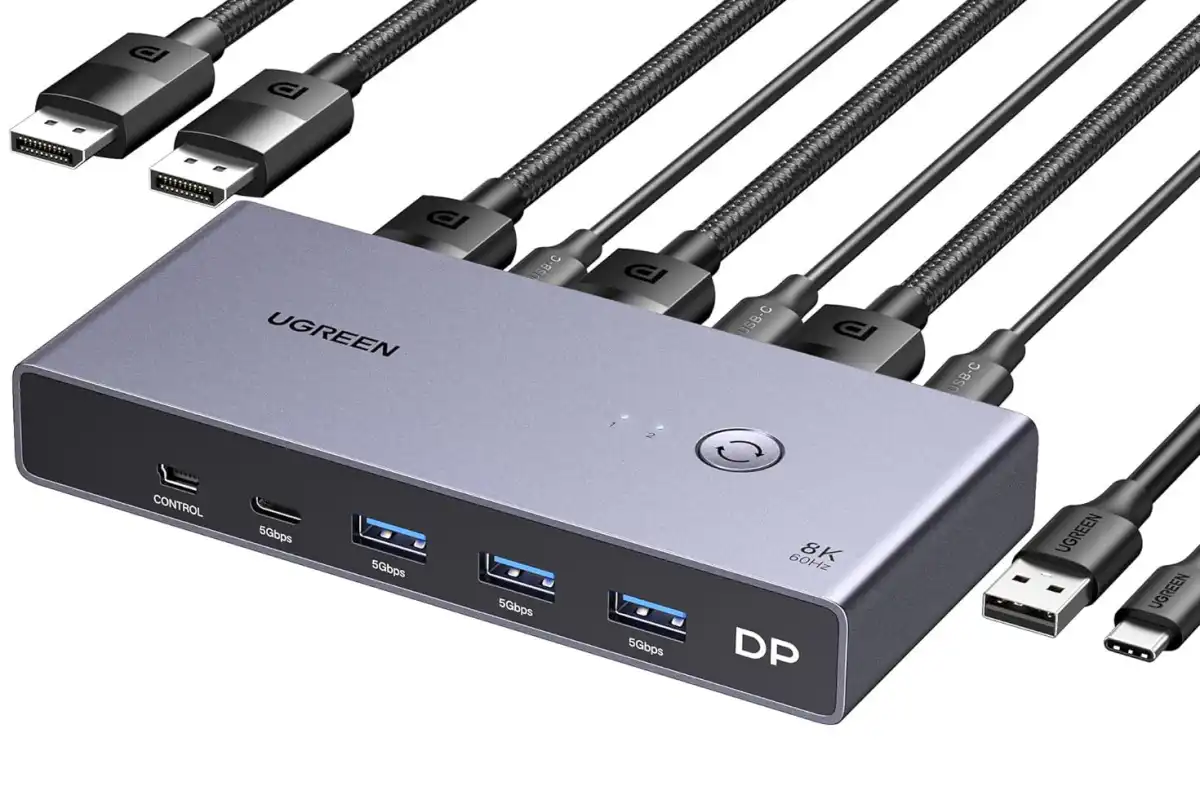
A KVM switch is one of the most valuable tools for managing multiple computers or servers from a single keyboard, monitor, and mouse. Whether you’re running an enterprise data center, maintaining a corporate server room, operating an industrial control system, or managing a home lab, the right KVM switch can improve efficiency, reduce hardware clutter, and simplify day-to-day administration.
However, choosing the wrong KVM switch can lead to compatibility issues, limited scalability, unnecessary expenses, and operational headaches. Many buyers focus only on price or port count without considering their long-term infrastructure needs.
This guide highlights the most common mistakes people make when buying KVM switches and explains how to avoid them, ensuring you invest in a solution that supports your business today and as it grows.
What Is a KVM Switch?
A KVM switch allows users to control multiple computers or servers using a single:
- Keyboard
- Video display
- Mouse
Instead of connecting separate peripherals to every system, administrators can quickly switch between connected devices with the press of a button or keyboard shortcut.
KVM switches are widely used in:
- Data centers
- Enterprise IT departments
- Network operations centers
- Industrial automation facilities
- Healthcare organizations
- Government agencies
- Broadcast environments
The right KVM switch saves space, reduces equipment costs, and streamlines server management.
Mistake 1: Choosing Too Few Ports
One of the most common mistakes is purchasing a KVM switch with just enough ports for current equipment.
While this may seem cost-effective initially, growing businesses often add:
- New servers
- Storage appliances
- Network devices
- Backup systems
Running out of available ports means replacing the entire KVM switch sooner than expected.
How to Avoid It
Choose a KVM switch with extra capacity or one that supports cascading and expansion. Planning for future growth helps protect your investment and minimizes future upgrades.
Mistake 2: Ignoring Video Interface Compatibility
Not all servers use the same video connection.
Common interfaces include:
- HDMI
- DisplayPort
- DVI
- VGA
Purchasing a KVM switch that doesn’t support your existing hardware can result in additional adapters, signal conversion issues, or even incompatible systems.
How to Avoid It
Verify the video interfaces used by all connected devices before purchasing. If your environment includes both legacy and modern equipment, consider a KVM switch that supports multiple interface options or compatible adapters.
Mistake 3: Overlooking USB Compatibility
Modern peripherals typically rely on USB connections, but older servers may still use PS/2 interfaces.
Failing to check peripheral compatibility can create unnecessary installation challenges.
How to Avoid It
Confirm that the KVM switch supports the keyboard, mouse, and USB devices used throughout your environment. Many enterprise models provide broad compatibility with both modern and legacy hardware.
Mistake 4: Forgetting About Remote Access
Many organizations now manage servers across multiple locations.
A local-only KVM switch may work well for a single server room but can become limiting as infrastructure expands.
How to Avoid It
If remote administration is important, consider an IP-based KVM switch. Remote KVM solutions allow authorized administrators to securely access servers from virtually anywhere, reducing travel time and improving response to system issues.
Mistake 5: Buying Based Only on Price
Budget is important, but the cheapest KVM switch is rarely the best value.
Low-cost models may lack:
- Reliable hardware
- Enterprise security features
- Long-term durability
- Expansion capabilities
- Technical support
Replacing unreliable equipment often costs more than investing in quality hardware from the beginning.
How to Avoid It
Evaluate total cost of ownership rather than purchase price alone. Reliability, performance, and long-term support often deliver greater value.
Mistake 6: Ignoring Rack Compatibility
Rack-mounted environments require equipment that fits properly within existing cabinets.
Some buyers overlook:
- Rack height
- Rack depth
- Rail compatibility
- Mounting hardware
Installation problems can delay deployment and increase costs.
How to Avoid It
Always verify physical dimensions and mounting requirements before ordering a rack-mounted KVM switch or console.
Mistake 7: Not Considering Integrated KVM Consoles
Many buyers purchase separate:
- Monitor
- Keyboard
- Mouse
- KVM switch
This approach increases hardware requirements and consumes valuable rack space.
How to Avoid It
Consider an integrated rack mount monitor with a built-in KVM switch. These all-in-one solutions improve organization while reducing cable clutter and equipment costs.
Mistake 8: Ignoring Security Features
Server access should always be protected.
Basic KVM switches may lack enterprise security capabilities.
Important security features include:
- User authentication
- Role-based permissions
- Audit logging
- Encrypted remote sessions
- Multi-user management
Organizations handling sensitive data should prioritize security when selecting a KVM solution.
Mistake 9: Underestimating Cable Management
Poor cable organization makes maintenance more difficult and can restrict airflow inside server racks.
Excessive cables also increase the risk of accidental disconnections.
How to Avoid It
Choose a KVM solution designed for organized cable routing and efficient rack integration. Clean cabling simplifies maintenance and improves overall infrastructure reliability.
Mistake 10: Choosing the Wrong Switching Method
Different KVM switches offer different ways to change between connected systems.
Common switching methods include:
- Front-panel buttons
- Keyboard hotkeys
- On-screen display (OSD)
- Web-based remote management
Selecting the wrong interface can slow daily workflows.
How to Avoid It
Choose a switching method that aligns with your team’s operational preferences and management style.
Mistake 11: Ignoring Display Resolution Support
Modern servers and workstations often require higher resolutions than older KVM switches support.
Using an outdated model can reduce image quality and limit productivity.
How to Avoid It
Verify the maximum supported resolution before purchasing. Ensure compatibility with current displays as well as future hardware upgrades.
Mistake 12: Failing to Consider Future Expansion
Many IT environments grow over time.
Purchasing hardware that cannot scale often leads to unnecessary replacement costs.
How to Avoid It
Look for KVM switches that support:
- Additional ports
- Cascading
- Firmware updates
- Flexible configuration options
Scalable solutions help accommodate future business growth.
Mistake 13: Buying Consumer Hardware for Enterprise Use
Consumer-grade KVM switches are often designed for occasional desktop use rather than continuous operation.
Enterprise environments demand:
- High reliability
- Durable construction
- Continuous uptime
- Professional support
How to Avoid It
Select enterprise-grade KVM switches specifically designed for server rooms, data centers, and mission-critical applications.
Mistake 14: Not Researching Vendor Support
Even high-quality hardware occasionally requires technical assistance.
Limited documentation or poor customer support can delay problem resolution.
How to Avoid It
Choose a trusted supplier that provides knowledgeable support, product expertise, and dependable after-sales service.
Who Benefits Most From KVM Switches?
KVM switches are valuable across numerous industries.
Common users include:
Data Centers
Efficiently manage large server deployments.
Enterprise IT Departments
Simplify administration while reducing hardware clutter.
Healthcare
Support hospital IT infrastructure with centralized management.
Government
Maintain secure server access in mission-critical environments.
Telecommunications
Monitor communication equipment and networking hardware.
Manufacturing
Manage industrial automation systems and production infrastructure.
Education
Support campus data centers and research computing facilities.
How to Choose the Right KVM Switch
Before making a purchase, ask yourself these questions:
- How many systems need to be managed?
- Will the environment expand in the future?
- Is remote access required?
- Which video interfaces are currently in use?
- Do you need rack-mounted installation?
- What display resolution is required?
- Are enterprise security features necessary?
- Would an integrated rack console improve efficiency?
Answering these questions will help narrow your options and ensure long-term satisfaction.
Why Businesses Choose Rackmount Sales
Choosing the right supplier is just as important as selecting the right hardware.
Rackmount Sales offers enterprise-grade KVM switches, rack mount monitors with integrated KVM functionality, LCD console drawers, and rack-mounted display solutions designed for demanding IT environments. Our products are trusted by data centers, healthcare organizations, government agencies, manufacturers, educational institutions, and telecommunications providers that require dependable performance and long-term reliability.
Whether you’re upgrading a small server room or building a large-scale enterprise data center, Rackmount Sales provides high-quality solutions backed by professional expertise and exceptional customer support.
Final Thoughts
A KVM switch is a long-term investment that directly affects server management efficiency, infrastructure organization, and operational productivity. Avoiding common buying mistakes can save your organization time, money, and unnecessary hardware replacements.
By considering factors such as scalability, compatibility, security, display support, remote access, and rack integration, you can choose a KVM switch that meets your current needs while supporting future growth. Enterprise-grade solutions provide greater reliability, easier maintenance, and better overall value than consumer-grade alternatives.
If you’re looking for dependable KVM switches and integrated rack-mounted console solutions, Rackmount Sales offers professional products designed to simplify server management and maximize the efficiency of modern IT environments.