How a sign design tool improves customer experience and order accuracy
Take a sign that has to be read from 30 feet away. The ADA table, applied to a sign mounted between 40 and 70 inches up, lands on letters about 3.6 inches tall (that’s my own arithmetic from the table: 5/8 inch, plus 1/8 inch for each foot past six). The rule of thumb of one inch of letter height per 10 feet says 3 inches. The SEGD suggestion, as it’s commonly quoted, is one inch per 25 feet, which gives 1.2. Same sign, same distance, three answers. And the customer gets to settle it while typing a number into a size box.
A caveat on that first rule. The ADA table covers the signs the ADA covers, which means permanent room and wayfinding signs. Vinyl banners and yard signs fall outside it. It’s the only one of the three I could check against published text: 5/8 inch minimum under six feet of viewing distance, then another 1/8 inch for every foot past that. The other two I only know are commonly quoted, and I couldn’t trace the SEGD figure to a source document.
So here’s where I land. Order accuracy on signs is a specification problem long before it’s a file problem. By the time a PDF exists, somebody has already guessed.
What a sign design tool settles before anyone opens a file
Most sign orders begin as one loose sentence in an email. About 24 by 36, double-sided, for outdoors. Somebody at the shop reads that, guesses what “outdoors” means for the substrate, and sends back a quote. PrintXpand’s signage page says manual quoting “takes hours and delays orders.” That’s a vendor describing the process it competes with, so I’d discount it a little.
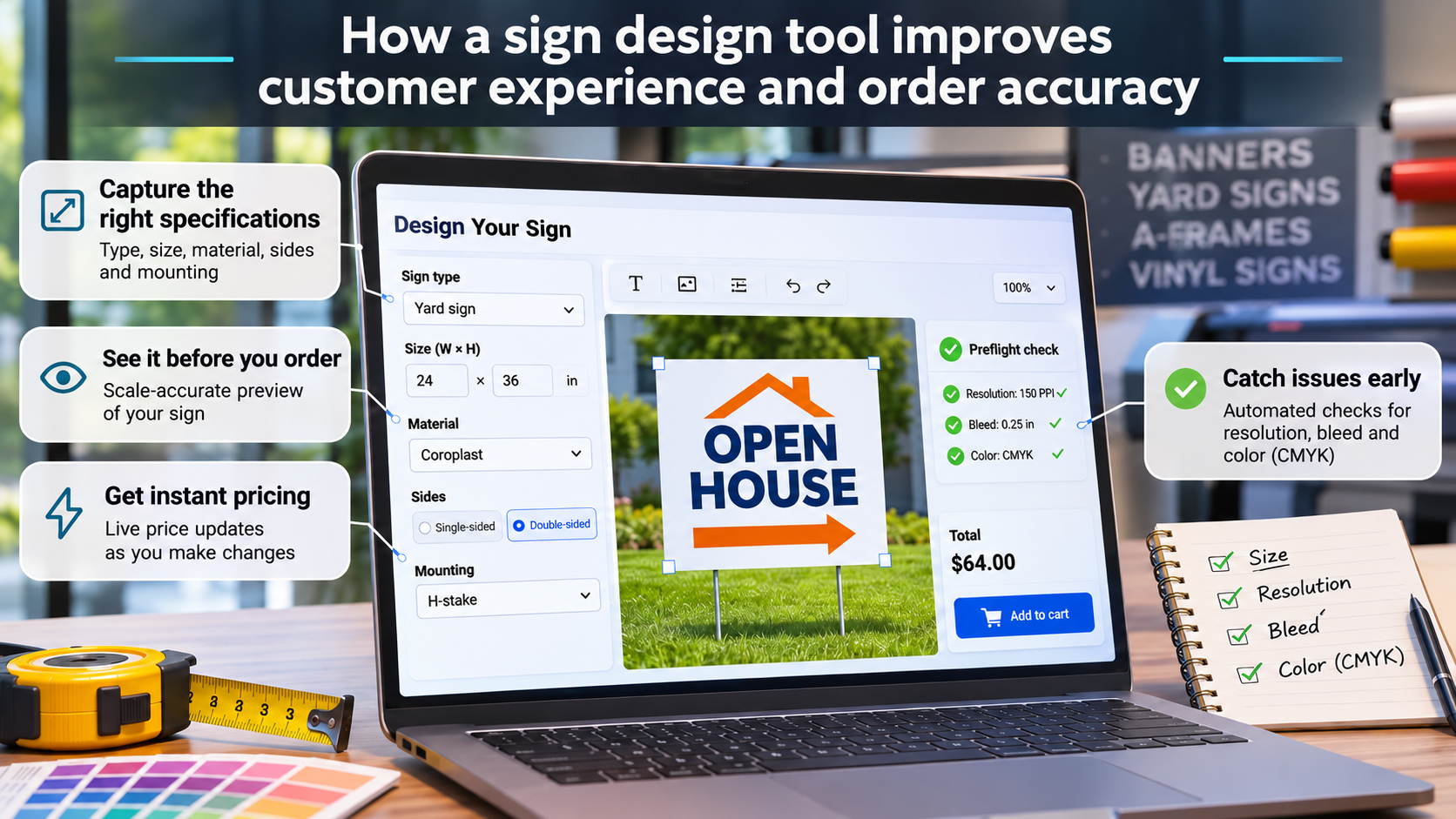
An online sign design tool turns that sentence into fields. According to PrintXpand’s sign page, the customer picks a type such as a yard sign or an A-frame, a shape from rectangle up to custom die-cut, and either a preset size or custom dimensions within limits the shop configures. Materials like Coroplast and aluminum each carry a weather-resistance rating. The price moves live as size and material change, and as the order flips between single-sided and double-sided. Mounting hardware gets chosen in the same step. That’s what the page says. I haven’t watched it run inside a shop.
Waiting for a quote on a one-off sign is the worst part of buying one, and a price and a picture on the spot removes the wait. The accuracy gain is quieter: size and finish get decided while the customer can still change them.
The page also mentions a scale-accurate preview. Accurate to what? A preview shows proportions on a screen. Whether it tells a customer that two-inch letters vanish at 30 feet depends on whether somebody built that warning in, and I couldn’t find a page that says either way.
Nobody agrees on the resolution floor
HP’s large format guidance says 100 to 150 PPI at final size is enough for a banner viewed from 8 to 10 feet, and that 300 PPI only pays off up close. Printer help pages I came across ask for at least 150, or in one case spread the range from 75 to 200 DPI by viewing distance. One template wanted 300. Safe-zone advice swings from 5 millimeters to well over an inch and a half.
Honestly, I wouldn’t trust any single PPI number, HP’s included. It’s a vendor’s rule of thumb with no data behind it. And “at final size” matters a lot: 150 DPI judged at 100 percent zoom on a monitor says nothing about the banner.
PrintXpand’s pages say uploaded artwork is preflighted automatically, with low-resolution logos and missing bleed flagged, and that the designer validates resolution, bleed and safe zones before checkout. The threshold isn’t published, and neither is whether a shop can set a different one for a mesh banner than for a rigid yard sign. A flag that fires at 150 on a banner HP calls fine at 100 sends a customer hunting for a bigger file for nothing, while a flag set too loose lets soft artwork reach the press and nobody finds out until it’s printed and hanging. The number is shop policy.
Color, where tools say less than I’d like
HP puts color inconsistency, meaning RGB versus CMYK, ahead of every other cause of large-format reprints. It’s a printer maker’s claim, and no data comes with it.
The mechanics aren’t exotic. Bright oranges and fluorescent tones in an RGB file sit outside what CMYK ink can reproduce, so they print duller. Vendors split on whether the customer should convert the file or the RIP should, since RGB can keep a wider range until the last step.
Here I have to correct something. An earlier draft of this piece said PrintXpand’s pages never mention color handling. They do. The signage page lists CMYK enforcement and ICC profile integration, and the sign page says output carries color profiles for UV or solvent print. What I still couldn’t find is any statement of what happens to an out-of-gamut color, or whether the customer sees the dulled version before paying.
Calibration lives on the shop floor anyway. A 2018 Sign Media Canada piece describes G7 as a method for bringing inkjet devices to a neutral gray reference, and says plainly that it won’t solve all of a shop’s color problems. No browser tool replaces that.
What the preview cannot know
The usual pitch says a sign design tool improves accuracy through automated preflight, so resolution and bleed problems get caught before press. All of that is checkable and worth checking. But the causes shop owners describe as frequent don’t live in the file.
A thread on the trade forum Signs101 asked what share of jobs get redone. The answers were anecdotes. One shop said 5 to 10 percent, another about 5, one well under 2 when its rules were followed, and rush jobs came in at 5 to 10 again. Measurement errors were named as a cause of frequent reprints. The thread is from 2012 and it’s a forum, so none of this is industry data. It’s still the closest thing to testimony I found.
What passes every preflight? A wrong dimension, measured at the site and typed in confidently. A misspelled word in a perfectly sharp font. A rushed job that skipped a second pair of eyes. And a scale-accurate preview of the wrong dimension is simply confidently wrong, which can be worse than an obviously rough mockup, because it looks like confirmation. PrintXpand describes an artwork approval portal for complex jobs, where the shop annotates the design and the customer signs off digitally. That’s the backstop.
How much does a reprint cost? I looked for a published figure and found none worth repeating. PRINTING United’s association says no industry standard for spoilage exists, though it notes that leading companies keep it below 1 percent of sales. Material, ink, press time and a displaced slot on the schedule all go into a reprint, and that’s my own reasoning, not a measured number. I couldn’t find an independent survey of sign-shop errors by cause either. I’d rather a shop track the square feet it wasted against the square feet it shipped than quote a rate that nobody has measured.
Where the specification goes next
A confirmed order still has to reach production, and that hop is where a good specification can get quietly damaged. PrintXpand’s Print MIS page says eCommerce orders become a job ticket in Print MIS automatically, as a structured job bag holding specs, artwork, notes and costing. The same page says every step of re-entry is a chance for error, and promises “zero re-entry, zero errors.” That last phrase is marketing, and the page publishes no accuracy figures to back it.
The sign page adds a detail I find more convincing than the slogan. For vinyl, the contour cut path auto-traces the design outline and travels with the file to the plotter. Nobody redraws the outline by hand, so nobody can redraw it wrong.
My opinion, for what it’s worth: the handoff counts as part of accuracy. A shop can capture a perfect spec at the front and still lose a finish option when someone retypes it into a ticket.
Not for every sign shop
Shops that mostly do bespoke installs, with surveys and measurements taken on location, will use a self-serve tool for a small slice of their work. Anything a customer can specify from a laptop is where it fits.
At PrintXpand, we treat the design tool as the place where the specification gets fixed, and everything after it just carries that specification along. Whether 5 percent is a lot of redos for a shop that takes orders from strangers online, I still can’t say.