How I Took Full Control of My Software with IObit Uninstaller 16

I used to think uninstalling a program on Windows was as simple as it gets. Don’t need something anymore? Just head into Settings, click Uninstall, wait a couple of seconds, and boom—gone. At least, that’s what I kept telling myself.
But after using my PC for a few years, reality hit. My C drive was somehow constantly in the red, even after I had purged every heavy app I could think of. To make things worse, every time I looked through my system, I’d stumble across mystery software I swear I never installed, abandoned game launchers sitting around, and a absurd pile of browser extensions that had quietly hijacked my web browsers over time.
That’s when it hit me: keeping a PC clean is never as simple as just hitting “uninstall.”It’s about knowing what’s actually taking up space, what’s safe to toss out, and what garbage gets left behind when an app claims it’s “gone.” I recently picked up IObit Uninstaller 16, and honestly, the new version completely changed how I deal with software cleanup on Windows.
Why the Normal Windows Uninstaller Wasn’t Enough
First of all, I was surprised to find such a massive accumulation of items on my computer. There were programs I hadn’t used in ages, leftover files from software I had long since uninstalled, and so many browser extensions that I couldn’t even recall when I had installed them. I even discovered some bundled software that I had absolutely no use for.
Windows’ uninstaller is fine for getting rid of a program, but that’s pretty much where it ends. IObit Uninstaller gave me a much easier way to deal with the rest. It can completely uninstall unwanted programs, bundleware, browser extensions, and Windows apps without leftovers.
My First Cleanup with IObit Uninstaller 16
I began by eliminating unused programs from my system. After opening IObit Uninstaller 16, I first browsed through the installed software. Here I first found some programs that have been lying around on my PC for months and which I have not even opened yet.
Usually I’d have to go into Windows Settings and remove them one at a time. But with IObit Uninstaller 16, I could pick a bunch of programs and uninstall them all at once. I also noticed that uninstalling a program didn’t always get rid of everything — old folders, temp files, and other leftovers were still sitting there taking up space.
Cleaning Up Windows’ Pre-Installed Apps
Windows comes with various pre-installed applications and system components. Some are useful to me, while others are things I simply never use.
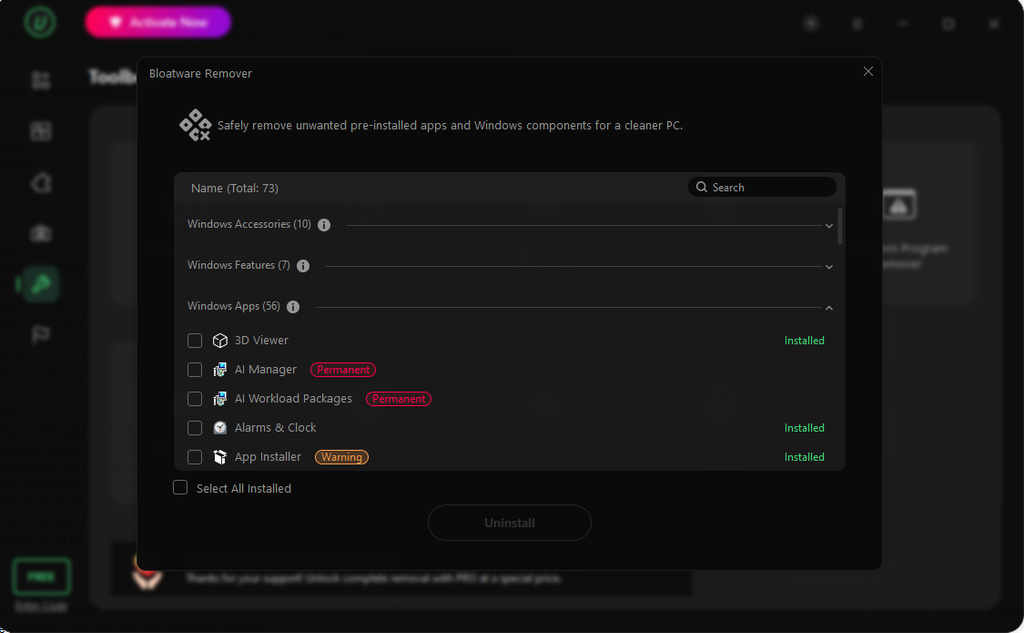
The problem is that removing certain built-in apps isn’t always straightforward through Windows’ normal settings. IObit Uninstaller 16 has a Bloatware Remover that can spot and clear out pre-installed Windows apps and system components you don’t need. I still check what an app or component does before deleting it. But having everything organized in one place makes that decision much easier.
Software Health Goes Beyond Uninstalling
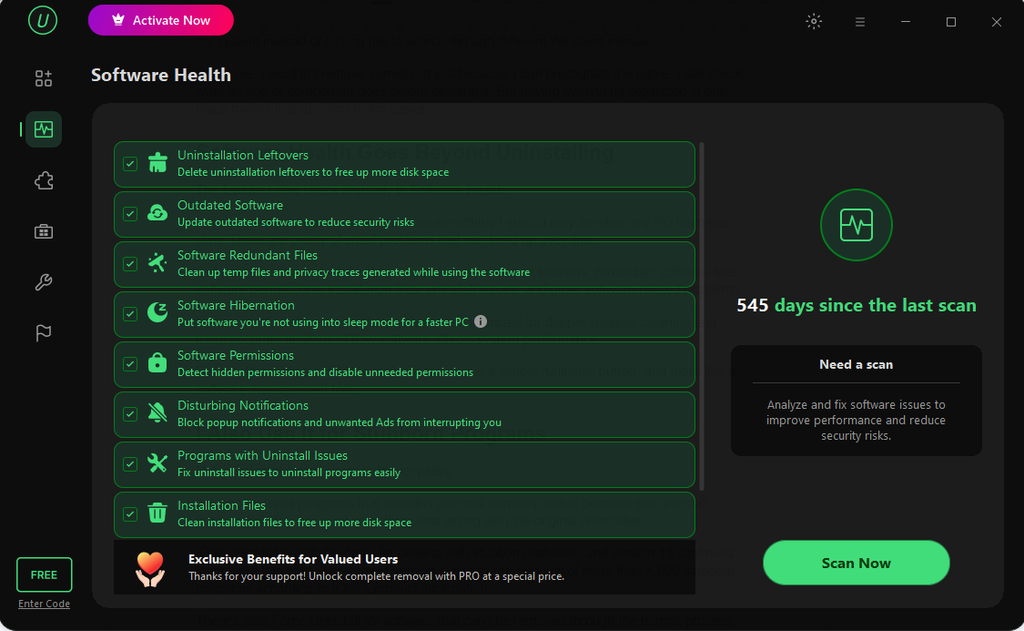
The feature I now check regularly is Software Health.
I don’t think of software maintenance as something I should only do when my PC becomes slow. There are plenty of small problems that can build up over time.
Software Health can look for things such as uninstallation leftovers, redundant software files, software permissions, installation files, uninstall issues, and other software-related problems.
In version 16, Software Health has also been optimized for deeper residual cleaning and more accurate analysis of how software affects system performance. For me, this makes IObit Uninstaller feel less like a simple “uninstall button” and more like a software management tool.
I Also Use It for Stubborn Programs
Not every application wants to leave quietly.
I’ve encountered programs that wouldn’t uninstall normally, either because the uninstall process failed or because something was wrong with the original uninstaller.
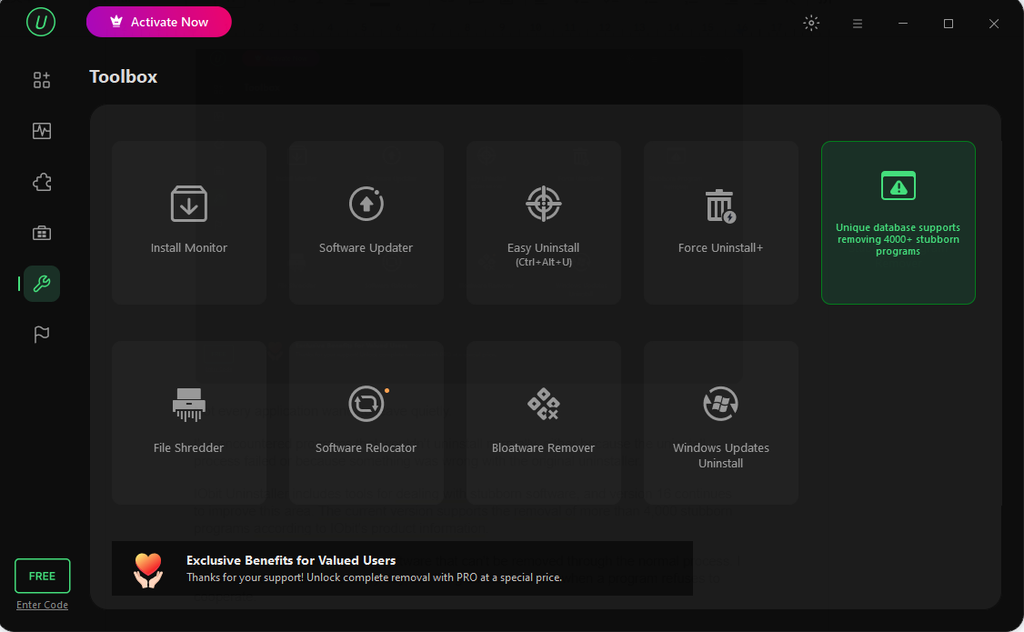
IObit Uninstaller includes tools for dealing with stubborn software, and version 16 continues to improve this area. The current version supports the removal of more than 4,000 stubborn programs according to IObit’s product information.
It also features a Force Uninstall option for those nightmare programs that refuse to budge through normal means. I don’t have to use it all the time, but it’s a lifesaver when a stubborn app decides to throw a fit and won’t go away.
Managing Browser Extensions
Another small but useful part of my cleanup routine is checking browser extensions.
It’s surprisingly easy to collect extensions over time. I’m terrible for adding a browser extension for one specific job and leaving it to gather dust forever. Half the time, I don’t even realize how many are clogging up my browser until I run a scan. Having IObit pull everything from Chrome, Edge, and Firefox into one single page made it ridiculously easy to just purge the junk. Plus, finally killing off those random site notifications and pop-ups that keep hijacking my screen was a huge relief. This makes my software cleanup feel more complete. I’m not only looking at the applications installed on Windows; I’m also checking some of the extras that affect my browsing experience.
A Cleaner Way to Manage My PC
First I wanted to thank you for the chance to review IObit Uninstaller 16, a truly reliable uninstaller for Windows. Honestly, after using it for a bit, I stopped stressing about PC cleanup altogether. I constantly download random apps for work or testing, but now I don’t hesitate because I know I can wipe them clean in two clicks. If my C drive gets tight? I just shift the app to another drive—problem solved. Windows sneakily installed useless junk again? The Bloatware Remover handles it. And the best part is actually seeing all those hidden leftover files get wiped out for good, rather than just crossing my fingers and hoping Windows actually deleted them.
I also really like the refreshed interface in this 16th version. The new design feels a lot more streamlined, which makes finding the exact cleanup tools I need super quick and straightforward.