How to Choose the Right Graphics Card for Your Gaming Resolution
Buying a GPU sounds simple until you actually try to do it. You open YouTube, watch three reviews, and suddenly feel like you need a second job just to afford decent performance. One person tells you that more VRAM fixes everything.
Another says clock speeds matter most. Meanwhile, your game still stutters. The truth sits in a much simpler place. Your screen resolution controls how hard your GPU works. If your card and resolution don’t align, performance suffers no matter how expensive the hardware looks.
Many gamers overspend on power they never use. Others underbuy and wonder why new titles feel unplayable.
This gaming GPU buying guide cuts through that confusion. We focus on resolution, real performance needs, and practical buying logic.
Why Gaming Resolution Shapes GPU Performance
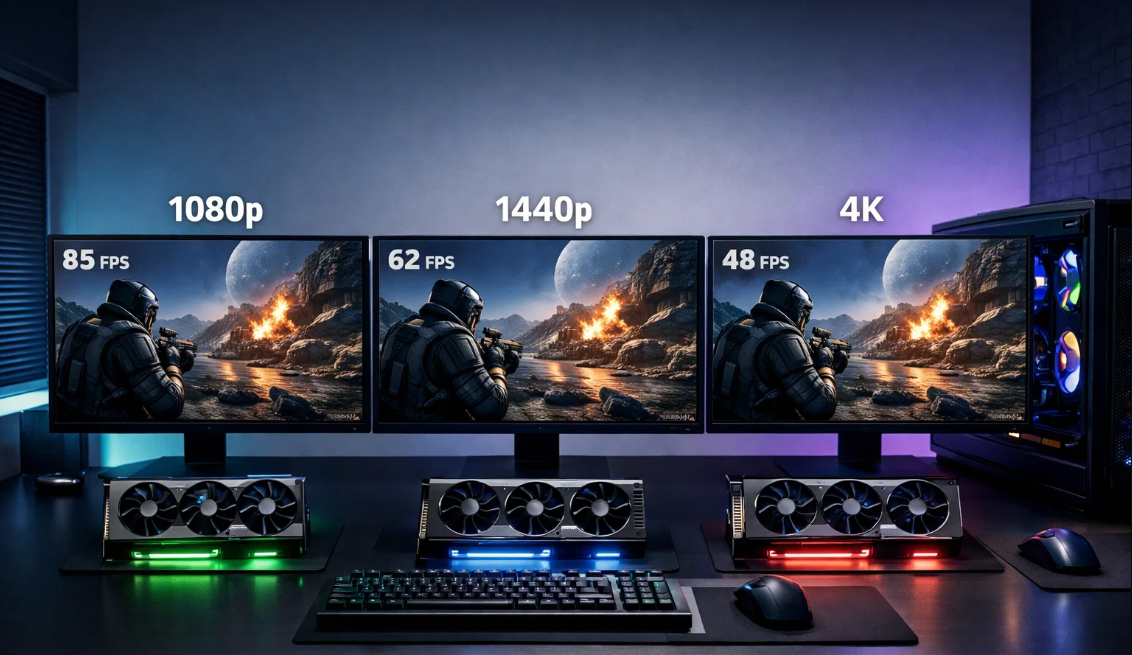
Resolution defines how many pixels your GPU renders every frame. More pixels demand more processing power. A mismatch between resolution and GPU strength creates problems fast.
A low-end graphics card for gaming struggles at high resolutions. High-end cards waste potential at low resolutions. This mismatch causes frame drops, heat spikes, and unnecessary power use.
Understanding this relationship saves money and frustration. It also extends hardware lifespan. Once you grasp this connection, GPU choices stop feeling random and start feeling logical.
Choosing a GPU Based on Resolution
1080p Gaming: Speed Over Excess Power
1080p gaming remains popular for good reason. It delivers clean visuals while keeping hardware demands reasonable. This resolution works perfectly for competitive gaming and high refresh rate monitors.
At 1080p, the best graphics card for gaming focuses more on frame output than heavy pixel processing. That means smoother motion and faster response times. Most modern mid-tier cards handle this resolution effortlessly.
You gain more by prioritizing cooling, stable drivers, and consistent clocks. Spending extra for extreme power at this resolution rarely improves real gameplay. Instead, it often increases heat and noise without visible gains.
1440p Gaming: Balance Between Clarity and Performance
1440p brings noticeable visual improvement. Text looks sharper. Environments feel deeper. Details stand out without overwhelming your system. However, this resolution increases pixel count significantly.
GPUs must work harder, especially in newer games with advanced lighting. Cards suited for this range balance memory bandwidth and efficiency. This resolution benefits players who want visual quality without sacrificing smoothness.
It also pairs well with high-refresh displays. Many gamers find this resolution hits the perfect middle ground for long-term satisfaction.
4K Gaming: Visual Perfection With Real Trade-Offs
4K gaming delivers unmatched sharpness. Every texture feels crisp. Every scene feels cinematic. That quality comes at a cost. GPUs push four times the pixels of 1080p. Even powerful cards struggle at ultra settings.
Thermal management becomes critical. Power consumption rises fast. Many players reduce settings to maintain stable frames. That compromise makes sense. At this level, consistency matters more than max sliders.
If immersion matters more than competitive speed, 4K offers a stunning experience when managed realistically.
How Game Type Changes GPU Requirements
Competitive Titles vs Immersive Games
Fast-paced competitive games value frame stability. Resolution matters less than responsiveness. Lower resolutions often provide better control and smoother motion. Story-driven and open-world games demand visual detail.
High-resolution textures and lighting effects stress GPUs differently. Your gaming preferences should influence your GPU choice. A single-player adventure benefits from stronger rendering power.
A competitive shooter benefits from reliable frame delivery. Matching the card to your playstyle improves enjoyment more than chasing specs.
Mods and Visual Enhancements
Mods increase GPU workload quickly. High-resolution textures, lighting mods, and visual overhauls demand more memory and processing power. Players who mod heavily should plan.
A card that feels sufficient today may struggle tomorrow. Leaving performance headroom helps future-proof your setup. This approach reduces the need for frequent upgrades and protects your investment.
Understanding VRAM, Cooling, and Power
VRAM plays a larger role as resolution increases. Higher resolutions load larger textures and assets into memory. Insufficient VRAM causes stutters and texture pop-ins. Cooling also matters.
GPUs throttle performance when temperatures rise. Efficient cooling maintains stable clocks and consistent frames. Power supply quality affects reliability. A stable system needs clean power delivery. Ignoring these factors often leads to performance issues unrelated to the GPU itself.
Practical Buying Tips That Actually Work
Start With Your Monitor
Your monitor dictates your target resolution and refresh rate. Buying a GPU that exceeds display limits wastes money. Buying below limits wastes visual potential. Always check display specifications first.
Balance CPU and GPU Performance
A powerful GPU paired with a weak processor creates bottlenecks. Frames drop despite high GPU usage. Balanced systems perform better and feel smoother overall.
Ignore Marketing Noise
Ignore flashy names and influencer hype. Focus on real benchmarks at your resolution. Performance numbers matter more than branding.
Plan Your Upgrade Path
If you plan to upgrade your display later, factor that into your GPU choice. Spending slightly more now may prevent an early replacement later.
Buying for Multiple Systems or Professional Use
Some buyers source GPUs for multiple machines. Gaming cafes, labs, and creators often purchase hardware in volume. Consistency becomes more important than peak performance. Identical models simplify maintenance and updates. Stable driver support reduces downtime. You can buy bulk graphics cards, as this approach saves time and money over long-term use.
Budgeting Without Regret
Set a clear budget to buy a best GPU. Decide what resolution you want to target. Choose performance based on that goal. Avoid stretching budgets for features you won’t notice. Spending smart delivers better satisfaction than spending big. Focus on smooth gameplay and reliability rather than chasing extremes.
Timing Your Purchase Wisely
GPU pricing fluctuates often. New launches affect older models. Sales appear unexpectedly. If your current setup runs games smoothly, waiting may save money. If performance frustrates you daily, upgrading now improves your experience instantly. Balance patience with enjoyment. Gaming exists for fun, not constant waiting.
Final Checklist Before Buying
- Confirm your monitor resolution and refresh rate
- Check real benchmarks for your favorite games
- Verify power supply compatibility
- Ensure proper airflow and case clearance
- Decide whether your focus stays short-term or future-ready
Following this list prevents common mistakes and simplifies decisions.
Conclusion
Choosing the right GPU becomes easy once resolution leads the decision. Everything else supports that choice. Lower resolutions reward efficiency and speed. Mid-range resolutions balance clarity and smoothness. High resolutions demand power and smart compromises.
When you align resolution, game style, and system balance, performance improves naturally. You avoid overspending and disappointment. More importantly, you enjoy games as they should feel.
Smooth motion. Stable frames. Clear visuals. Thoughtful choices always beat impulsive upgrades. Pick with intention, and your setup will reward you every time you hit play.