Why Workplace EV Charging Is Becoming a Standard Perk (and How to Set It Up Without the Headaches)
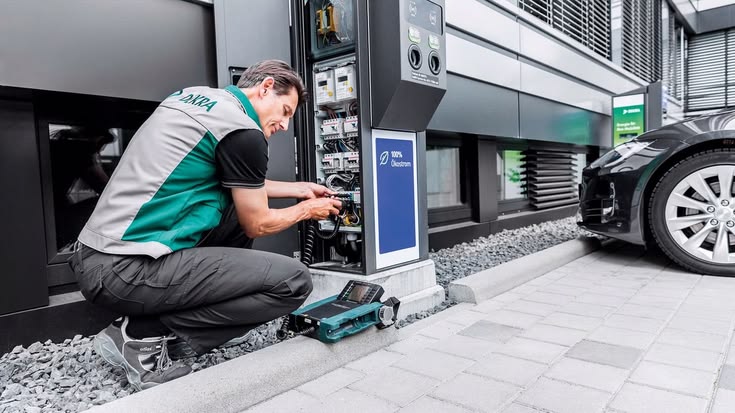
A few years ago, an EV charger in the office parking lot was a novelty. Someone in facilities would point it out on a tour, and people would nod politely. Now it comes up in interviews, in lease negotiations, and in conversations about whether employees want to come into the office at all.
If you manage a building, run a business, or just got handed the “look into EV charging” task by your boss, this guide is for you. It covers why employers are adding chargers, what to figure out before you buy anything, and the mistakes that tend to cost the most.
Why Employers Are Paying Attention
The simplest reason is that more of your staff are driving electric. Many of them live in apartments, rent, or park on the street, so they can’t plug in at home. For those people, the workplace is the only realistic place to charge. A car that sits in your lot for eight hours is a perfect fit for a charger.
There are a few other reasons it keeps landing on leadership’s agenda:
- Hiring and retention. People notice when an employer makes their commute easier. A charger won’t win over a candidate on its own, but it counts toward whether your company feels current.
- Sustainability goals. If your company reports on emissions, charging infrastructure is a visible, concrete step. It’s easier to point at than a policy document.
- Customer and visitor appeal. Chargers in a shared lot can serve guests, clients, and delivery drivers too.
- Fleet readiness. Companies with service vehicles or pool cars often find that the same infrastructure grows into a fleet charging setup later.
None of these reasons is dramatic on its own. Together they make a decent case.
Start With Your People, Not Your Parking Lot
The most common mistake is jumping straight to hardware. Before you look at a single charger, find out who will actually use it.
Send a short survey. Ask how many employees drive an EV or plan to buy one in the next couple of years. Ask how far they commute and how long they usually stay. A person who drives 10 miles and parks for eight hours needs very little energy from your charger. A person with a long commute and a battery near empty needs more.
This tells you how many ports you need and how fast they should be. It also stops you from overbuilding. Plenty of offices have installed twelve fast chargers when four slower ones would have kept everyone happy.
Understanding the Basics: Speed and Power
You’ll hear a lot of jargon, so here’s the short version.
Level 1 uses a standard wall outlet. It’s very slow, adding only a few miles of range per hour. It’s fine in a pinch, but it isn’t a real workplace solution.
Level 2 is the sweet spot for most offices. It runs on a higher-voltage circuit and can add a meaningful amount of range during a normal workday. For employees who park for six to nine hours, this is usually plenty.
DC fast charging is the quick option you see along highways. It’s powerful but expensive to install and demands serious electrical capacity. Most workplaces don’t need it unless they run a fleet or serve the public with a lot of turnover.
For a typical office, Level 2 is the right starting point. You can always add more later.
Check Your Electrical Capacity Early
This is the part that surprises people. The charger itself is often not the expensive piece. The electrical work behind it is.
Before you commit, have an electrician look at your panel and your service capacity. Ask a few direct questions:
- Does the building have enough spare capacity for the chargers you want?
- How far is the parking area from the electrical room? Longer runs cost more.
- Will you need trenching, conduit, or a panel upgrade?
- Could you add more ports later without redoing everything?
That last question matters a lot. Running extra conduit while the ground is already open is cheap. Coming back to dig up the lot in two years is not.
If capacity is tight, ask about load management. Smart systems can share available power across several chargers so they don’t all pull maximum current at once. This can let you install more ports without an expensive service upgrade.
Decide Who Pays and How
Once the hardware question is settled, you’ll hit the policy question: who covers the electricity?
There are a few common models:
- Free for employees. Simple and popular as a perk, but you absorb the cost. It works best if usage is modest.
- Paid by the user. Drivers pay per session or per kilowatt-hour through an app or card. This keeps your costs predictable and fair.
- Hybrid. Some employers cover a set amount per month, then charge beyond that.
There’s no single right answer. Many companies start free to encourage adoption, then switch to paid once usage grows. Whatever you choose, be clear about it up front. Nothing irritates people faster than a surprise rule change after they’ve built their routine around a free charger.
You’ll also want a system that tracks usage by port. Even if charging is free, you’ll want the data. It tells you when the chargers are busy, who uses them, and when it’s time to expand.
Think About Etiquette Before It Becomes a Problem
Here’s a scenario that plays out in nearly every office with chargers. One person plugs in at 8 a.m. and leaves the car there until 5 p.m., even though it was full by 10. Meanwhile, three coworkers circle the lot waiting.
A few small rules prevent most of the friction:
- Ask drivers to move their car once charging is done.
- Consider a time limit during peak hours.
- Offer a simple way to notify others, like a shared chat channel or a notification from the charging app.
- Mark the spots clearly so non-EV drivers don’t park in them.
You don’t need a thick policy document. A one-page set of guidelines, posted near the chargers and shared by email, is usually enough.
Choosing a Provider You Can Rely On
The market for charging hardware and software is crowded, and not every option is a good long-term fit. The questions below can help you cut through the sales pitches.
Is the hardware reliable? A charger that’s out of order half the time frustrates everyone and makes the whole project look like a waste. Ask about uptime and what happens when something breaks.
Is the software easy to use? Drivers should be able to start a session in seconds. Administrators should be able to set pricing, manage access, and pull reports without calling support.
Can it grow with you? Your first four ports might become twenty. Look for a system that scales without forcing you to replace everything.
Who handles installation and support? Some providers manage the whole thing, from site assessment to permits to ongoing maintenance. Others just sell you hardware and leave the rest to you. For a team that’s already stretched thin, the full-service route often saves time and stress.
If you’re comparing options, it helps to look at providers that specialize in workplace EV charging solutions rather than generic hardware vendors. Specialists tend to understand the real-world issues, like shared parking, mixed user groups, and billing, because they deal with them every day.
Don’t Forget Incentives
Before you finalize a budget, spend an hour looking into incentives. Depending on where you are, there may be federal, state, regional, or utility programs that cover part of the cost of hardware and installation. Some utilities also offer special rates for EV charging or rebates for installing managed-charging systems.
These programs change often, and eligibility rules can be picky. Check the current terms directly with your utility and local energy agency. A short phone call can save a surprising amount of money.
Plan the Rollout Like a Product Launch
You’ve picked a provider, finished the install, and the chargers are live. Don’t just hope people notice.
Announce it. Send an email, post it in your company chat, and put a sign in the lobby. Walk people through how to start a session. Share the etiquette guidelines at the same time, so the habits form from day one.
Then check in after a month. Look at the usage data. Are the chargers busy all the time, or barely touched? Are there complaints? Are people leaving cars plugged in too long? Small adjustments early on, like tweaking time limits or adding a port, make a big difference.
Common Mistakes to Avoid
After watching many offices go through this, a few errors come up again and again:
- Buying too much, too soon. Start with what your survey supports and plan for expansion.
- Ignoring electrical limits. Surprise upgrade costs can blow up a budget.
- No clear rules. Without guidelines, a handful of people end up hogging the chargers.
- Skipping accessibility. Make sure at least some spots are reachable and usable for people with disabilities.
- Forgetting maintenance. Chargers need regular checks, cable inspections, and software updates.
None of these are hard to fix if you catch them early. They only turn into expensive problems when nobody’s watching.
The Bottom Line
Workplace charging isn’t a flashy project, but it’s one of those quiet upgrades that people genuinely appreciate. It solves a real problem for employees who can’t charge at home, it supports sustainability goals, and it makes your site more useful to everyone who visits.
Start small, talk to your people, get your electrical capacity checked, and set clear ground rules. Do that, and you’ll end up with a setup that works smoothly today and has room to grow as more of your team makes the switch.