6 Things to Check Before Buying a Memory Card for Your Camera
Buying storage for a camera seems like it should be simple. Find a card with enough space, put it in the camera and start shooting. Then you look at the packaging and find unfamiliar symbols, speed ratings and capacity numbers that make a basic purchase suddenly feel much more complicated.
Those details aren’t just marketing. Choosing the wrong memory card can limit how quickly your camera saves photos, interfere with certain video modes or simply leave you with storage that your camera doesn’t fully support. Fortunately, you don’t need to understand every technical specification to make a sensible choice.
Here are six things worth checking before you buy.
1. Make Sure It’s the Right Type
Start with the simplest question: what type of storage does your camera actually accept?
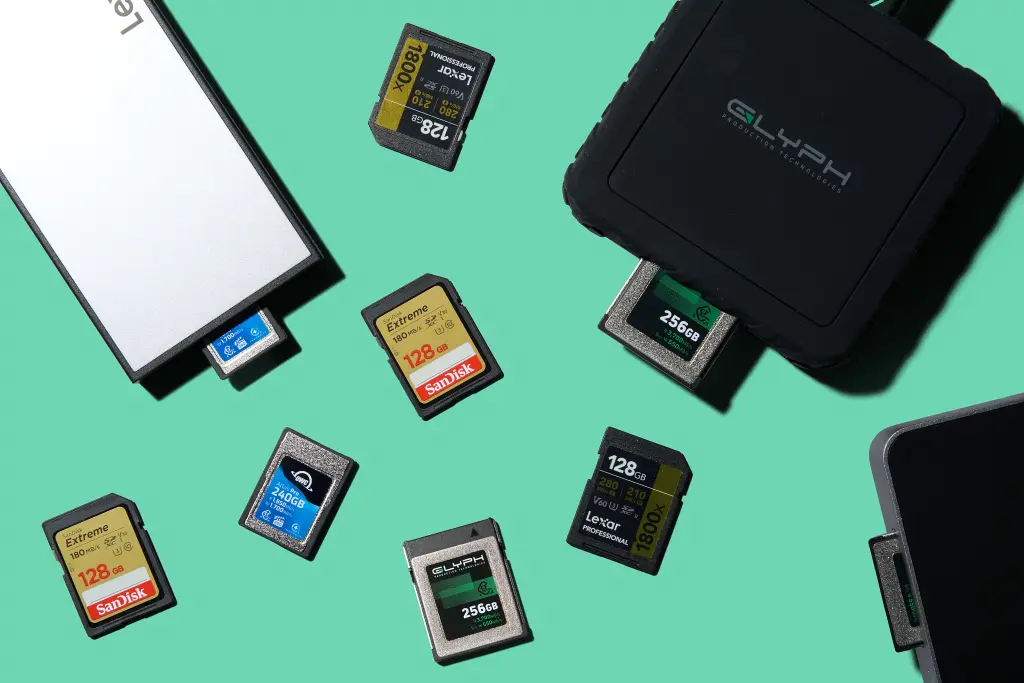
SD cards are extremely common, but they’re not universal. Depending on the camera, you might encounter SD, microSD, CFexpress or other formats. Some higher-end cameras also have two slots that may accept different card types.
Don’t judge compatibility by whether a card looks roughly the right size. Check the camera’s manual or manufacturer’s specifications for the supported formats.
If you’re using a microSD card with an SD adapter, check whether the manufacturer recommends that setup for your particular camera and intended use.
2. Check the Maximum Supported Capacity
Two cards can look identical from the outside while offering dramatically different amounts of storage.
SD cards, for example, belong to different capacity standards. SDHC typically covers capacities from 4GB to 32GB, while SDXC extends from above 32GB up to 2TB. Compatibility with these standards depends on the device.
This becomes particularly important with older cameras. Buying a huge-capacity card isn’t useful if the camera can’t recognise it.
Check your camera’s specifications before automatically choosing the largest option available.
Your own shooting habits matter too. Someone taking occasional JPEG photos may need relatively little space, while shooting RAW images or high-resolution video can consume storage much faster.
3. Don’t Confuse Capacity With Speed
A 256GB card isn’t necessarily faster than a 64GB one.
Capacity tells you how much information can be stored. Speed tells you how quickly data can be written to or read from the card. They’re separate specifications, and both can matter.
Write speed is particularly important when the camera is creating lots of data quickly. This can happen when shooting bursts of high-resolution photographs or recording demanding video formats.
If the card can’t keep up, the camera may have to pause while its internal buffer clears. Certain video recording options may also require a minimum sustained write speed.
Rather than simply buying the fastest product you can find, check the speed requirements recommended by your camera manufacturer for the shooting modes you plan to use.
4. Understand the Speed Symbols That Matter
This is where the label can start looking like alphabet soup.
You may see markings for Speed Class, UHS Speed Class and Video Speed Class. These ratings provide information about minimum sustained write performance.
Common Video Speed Class markings include V30, V60 and V90. The number corresponds to a minimum sustained write speed in megabytes per second. For example, V30 indicates at least 30MB/s under the relevant standard.
That doesn’t automatically mean everyone needs a V90 card. A photographer taking ordinary still images may gain little from paying for performance their camera doesn’t require.
Check your camera manual, particularly if you’re recording high-resolution or high-frame-rate video. It will often specify the class or minimum write performance needed for particular recording modes.
5. Check Whether Your Camera Can Use the Extra Speed
There’s another reason not to automatically buy the fastest option on the shelf: your camera may not be able to take advantage of it.
SD cards and cameras can use different bus interfaces, including UHS-I and UHS-II. UHS-II cards have an additional row of contacts and can support higher potential transfer speeds when paired with compatible equipment.
Put a fast UHS-II card into a camera that only supports UHS-I and the card may still work, depending on compatibility, but you won’t receive the full performance you paid for.
Your card reader matters as well. A faster card paired with a suitable reader can reduce the time required to transfer a large collection of photos or videos to your computer.
6. Buy From a Source You Trust
Storage isn’t a great place to gamble on a suspiciously cheap deal.
Counterfeit and misrepresented flash storage exists, and a card may appear normal until you start relying on it. In some cases, the advertised capacity or performance may not match what the product actually provides.
Stick with established manufacturers and reputable retailers. Be particularly cautious when a high-capacity, high-speed card is being sold for dramatically less than comparable products.
Once you receive a new card, format it in the camera according to the manufacturer’s instructions before an important shoot. It’s also sensible to test it rather than discovering a problem when you’re photographing something you can’t repeat.
Choose for Your Camera, Not the Biggest Number
It’s easy to get caught up comparing capacities and impressive-looking speed figures, but the best choice isn’t necessarily the largest or fastest option available.
Start with your camera. Find out which format, capacity and speed standards it supports, then think about what you actually shoot. Someone recording demanding video has different requirements from someone taking family photos on weekends.
A few minutes spent checking compatibility before buying can save money, prevent performance problems and give you confidence that your storage will keep up when you need it.