Canvas Spoofing Test Results: What the 2026 Data Shows
Every antidetect browser says it can help you change the fingerprints made by canvas. But most of them do not say how often all the details will be right when a strong checker looks at canvas. And it checks more than 40 other things as well.
That second number tells you if the account will stay open or if it will close.
What Do Canvas Spoofing Test Results Really Measure?
Short answer: A good test can show if the canvas result for a profile works the way it should and looks right on the device. It does not just look at if this profile is different from other profiles. The most helpful public canvas spoofing test results come from one main test. This test used 16 browsers and had 12,800 profiles in all. In the AntidetectData test, every profile had to pass 47 fingerprint checks. There were two canvas checks. One was to see if the canvas image hash stayed the same and matched what it should. The other tested if text size did not change and was right.
How Canvas Fingerprinting Works
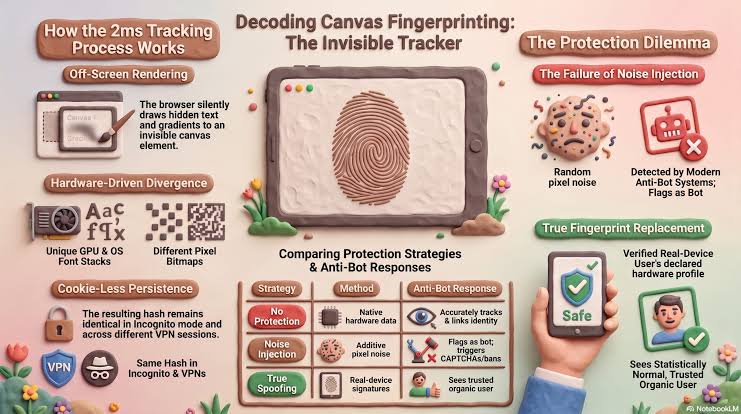
A web page uses code to put text and shapes on a drawing area made with HTML5. You can not see these shapes. Then, the page checks tiny spots on this area and makes a hash. Your computer’s GPU, drivers, the fonts you use, and the way text shows up can change the hash. But most of the time, the hash stays the same each time you come back.
It is not just a small trick. Princeton’s Web Census of the top 1 million sites showed that canvas fingerprinting was found on 14,371 sites. These sites used scripts coming from about 400 domains. A new study in Computers & Security on detecting browser fingerprinting looked at 100 fingerprinting scripts. It showed that about one out of five scripts is used for ads and tracking.
The Three Ways Browsers Spoof Canvas
Not every type of spoofing works the same way. Here is a look at how each common kind is different from the others:
| Method | How it works | Main weakness |
| Noise injection | Adds tiny random changes to pixel output | Rendering twice can reveal a mismatch |
| Blocking | Refuses canvas reads entirely | A blocked canvas looks rare and suspicious |
| Consistent replacement | Returns a believable hash tied to the profile | Must match the claimed GPU and OS |
The last way often wins when the rules are strict. That is because these systems look for things that do not change. They do not pay a lot of attention when something is not the same. A canvas hash might say it is an Intel laptop. But WebGL might show a desktop Nvidia card. That gives their system a big clue.
The 2026 Results
The benchmark does not give a score for just canvas. So, the best way to see this is to look at the full pass rate. This shows the number of people who pass all 47 things, including canvas, at the same time.
| Browser | Check-level pass | Full-profile pass |
| Incogniton | 97.8% | 91.4% |
| Octo Browser | 96.9% | 88.7% |
| Multilogin | 96.1% | 86.2% |
| Kameleo | 95.2% | 83.1% |
| GoLogin | 94.8% | 82.5% |
| AdsPower | 94.1% | 80.9% |
Look at the space that is between the two columns. A browser can go through about 94% of the checks for each person. But about one in five checks does not pass at least one test. That check is the one that gets marked.
Testing was done from August to October in 2025. Every test used the same hardware. People in three countries used residential proxies for these tests.
There was not a big difference in scores. Incogniton was just 0.9 points ahead of Octo at the first check. For the whole set, Incogniton got 2.7 points more than Octo.
Common Mistakes That Break Canvas Spoofing
Most problems do not begin with the browser. They happen because the setup you choose can work against the profile itself.
- Mismatched OS and fonts. If you see a “macOS” setup, but it uses fonts that you will find only in Windows, people will know it is not the real thing.
- Random noise shows up each time you open the page. If the hash does not be the same when you load it again, the checkers think someone might have changed it.
- Extensions that use canvas. Privacy add-ons in an antidetect browser can make the output change two times.
- Copying one person’s info 50 times. The same canvas hashes can be found in many accounts. That connects them.
How to Run Your Own Canvas Test
Don’t stick to only one list. Take some time to look around for yourself.
1.Open the same profile two times. Look at the canvas hash both times. These will be the same.
2. Run the text in two or three tools. Check for things that show someone made changes. Do not just check if it does not match.
3. Make sure the screen, WebGL brand, and fonts all match. They should show the same device.
You need to do this again when your browser updates. A browser update can change something. This means spoofing may stop working quickly.
Published results from canvas spoofing tests can help you pick from a few options. After that, when you run your own tests, you can see if the setup will work with the sites you use.
Conclusion
Canvas spoofing keeps things looking the same, so it matches the rest of what shows about you online. In the 2026 data, Incogniton, Octo Browser, and Multilogin all worked well. They help you seem like you are the same person on every site. But there was not a big gap between them. Which tool do you think is best for the canvas tests?
FAQ
Is a unique canvas fingerprint bad?
No, this is not always true. A hash that people know and trust, and that stays the same, is more important than a hash you get only now and then.
Can a VPN hide my canvas fingerprint?
No. A VPN only changes the IP you use. It does not change how your device shows pictures or graphics.
How often should I retest?
You need to do this every time the browser or driver changes. Also, try to do it once a month.